
Wednesday, 9 November 2011


Tuesday, 1 November 2011
Making Website with your Own Free Unlimited Domain
Making Website with your Own Free Unlimited Domain [re-edited - made easier for newbies]
Did you know that you can create your own free unlimited domain name with hosting for free?Meaning you can have your very own web sites.
||||Here's a complete tutorial made easier for you. Especially newbies|||
1. First Select which domain name suits you. (dot.tk or co.cc. Choose one)
 or
or 
Just register and follow the simple steps provided.
2. Second Select your hosting Plan (Binhoster or Byethost. Choose one)
 or
or 
3. After you choose your domain name and hosting plan. We need to setup the following.
*Domain Nameserver
Binhoster Nameserver:
Byethost Nameserver:
Did you know that you can create your own free unlimited domain name with hosting for free?Meaning you can have your very own web sites.
||||Here's a complete tutorial made easier for you. Especially newbies|||
1. First Select which domain name suits you. (dot.tk or co.cc. Choose one)
or Just register and follow the simple steps provided.
2. Second Select your hosting Plan (Binhoster or Byethost. Choose one)
or 3. After you choose your domain name and hosting plan. We need to setup the following.
*Domain Nameserver
Binhoster Nameserver:
- ns1.binhoster.com
- ns2.binhoster.com
- ns3.binhoster.com
- ns4.binhoster.com
Byethost Nameserver:
- ns1.byet.org
- ns2.byet.org
- ns3.byet.org
- ns4.byet.org
- ns5.byet.org
How to create screenshot with Media Player Classic
Here is step-by-step tutorial on how to create screenshot with Media Player Classic:
1.Open Media Player Classic then Go to menu views

2.Select Options…

1.Open Media Player Classic then Go to menu views
2.Select Options…
How To Show or Display Hidden Files and Folders
| How To Show or Display Hidden Files and Folders (Windows XP) 1.Open Folder Options in Control Panel.
2.On the View tab, under Hidden files and folders, click Show hidden files and folders. Note:
(Windows Vista) 1. Open Folder Options by clicking the Start button  , clicking Control Panel, clicking Appearance and Personalization, and then clicking Folder Options. , clicking Control Panel, clicking Appearance and Personalization, and then clicking Folder Options.2. Click the View tab. 3. Under Advanced settings, click Show hidden files and folders, and then click OK. |
How To: Get Rid Of Thumbs.db In Windows XP
What is Thumbs.db? Thumbs.db is a hidden file generated automatically by Windows, you will see it in many folders if you have set the “Show hidden files and folders” option in the “Folder Options” window on. Although Windows mostly generates it to speed things up, some times it is annoying especially when you try to zip a folder or upload a folder using ftp to your site. If you delete Thumbs.db from your windows folders, Windows will generate it again when you re-open the folders if you have Filmstrip or Thumbnails selected in the View menu of those folders.
To get rid of it:
1) Open any folder and click Tools > Folder Options.
2) Click the View tab from the Folder Options window.
3) In the Advanced Settings check “Do not cache thumbnails“.
You can choose “Show hidden files and folders“, search for Thumbs.db files and delete them all, using the previous steps windows will not generate it again.
To get rid of it:
1) Open any folder and click Tools > Folder Options.
2) Click the View tab from the Folder Options window.
3) In the Advanced Settings check “Do not cache thumbnails“.
You can choose “Show hidden files and folders“, search for Thumbs.db files and delete them all, using the previous steps windows will not generate it again.
Get Adsense acc within 48hours
You need to sign-up below site
After signing up there visit this page:
http://www.indyarocks.com/adsense/adsense_index.php
Complete the minimum requirements i.e. you need to upload at least 10 photos and fill 50% of profile information blah blah..
Proof?
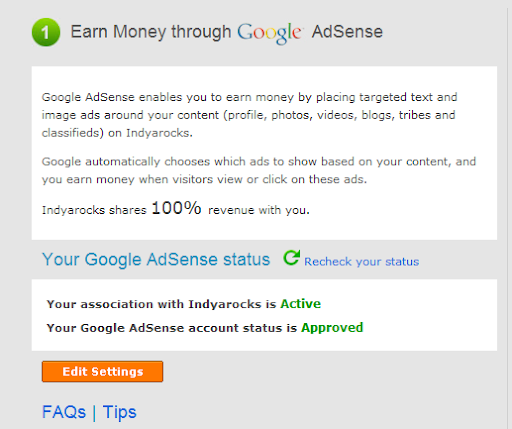

After signing up there visit this page:
http://www.indyarocks.com/adsense/adsense_index.php
Complete the minimum requirements i.e. you need to upload at least 10 photos and fill 50% of profile information blah blah..
Proof?
About The Meanings of Cam,TS,TC,Scr...
CAM
A cam is a theater rip usually done with a digital video camera. A mini tripod is sometimes used, but a lot of the time this wont be possible, so the camera make shake. Also seating placement isn't always idle, and it might be filmed from an angle. If cropped properly, this is hard to tell unless there's text on the screen, but a lot of times these are left with triangular borders on the top and bottom of the screen. Sound is taken from the onboard microphone of the camera, and especially in comedies, laughter can often be heard during the film. Due to these factors picture and sound quality are usually quite poor, but sometimes we're lucky, and the theater will be fairly empty and a fairly clear signal will be heard.
TELESYNC (TS)
A telesync is the same spec as a CAM except it uses an external audio source (most likely an audio jack in the chair for hard of hearing people). A direct audio source does not ensure a good quality audio source, as a lot of background noise can interfere. A lot of the times a telesync is filmed in an empty cinema or from the projection booth with a professional camera, giving a better picture quality. Quality ranges drastically, check the sample before downloading the full release. A high percentage of Telesyncs are CAMs that have been mislabeled.
TELECINE (TC)
A telecine machine copies the film digitally from the reels. Sound and picture should be very good, but due to the equipment involved and cost telecines are fairly uncommon. Generally the film will be in correct aspect ratio, although 4:3 telecines have existed. A great example is the JURASSIC PARK 3 TC done last year. TC should not be confused with TimeCode , which is a visible counter on screen throughout the film.
SCREENER (SCR)
A pre VHS tape, sent to rental stores, and various other places for promotional use. A screener is supplied on a VHS tape, and is usually in a 4:3 (full screen) a/r, although letterboxed screeners are sometimes found. The main draw back is a "ticker" (a message that scrolls past at the bottom of the screen, with the copyright and anti-copy telephone number). Also, if the tape contains any serial numbers, or any other markings that could lead to the source of the tape, these will have to be blocked, usually with a black mark over the section. This is sometimes only for a few seconds, but unfortunately on some copies this will last for the entire film, and some can be quite big. Depending on the equipment used, screener quality can range from excellent if done from a MASTER copy, to very poor if done on an old VHS recorder thru poor capture equipment on a copied tape. Most screeners are transferred to VCD, but a few attempts at SVCD have occurred, some looking better than others.
R5
From Wikipedia, the free encyclopedia
This article is about the DVD format. For other uses, see R5.
R5 refers to a specific format of DVD released in the Former-Soviet Union, which is in DVD Region 5.
In an effort to compete with movie piracy, the movie industry chose to create a new format for DVD releases that could be produced more quickly and less expensively than traditional DVD releases. R5 releases differ from normal releases in that they are usually a direct Telecine transfer of the film without any of the image processing common on DVD releases, and without any special features. This allows the film to be released for sale at the same time that DVD Screeners are released. Since DVD Screeners are the chief source of high-quality pre-DVD release pirated movies, this allows the movie studios to beat the pirates to market. Bootlegged copies of these releases are often distributed on the Internet via torrent sites.
A cam is a theater rip usually done with a digital video camera. A mini tripod is sometimes used, but a lot of the time this wont be possible, so the camera make shake. Also seating placement isn't always idle, and it might be filmed from an angle. If cropped properly, this is hard to tell unless there's text on the screen, but a lot of times these are left with triangular borders on the top and bottom of the screen. Sound is taken from the onboard microphone of the camera, and especially in comedies, laughter can often be heard during the film. Due to these factors picture and sound quality are usually quite poor, but sometimes we're lucky, and the theater will be fairly empty and a fairly clear signal will be heard.
TELESYNC (TS)
A telesync is the same spec as a CAM except it uses an external audio source (most likely an audio jack in the chair for hard of hearing people). A direct audio source does not ensure a good quality audio source, as a lot of background noise can interfere. A lot of the times a telesync is filmed in an empty cinema or from the projection booth with a professional camera, giving a better picture quality. Quality ranges drastically, check the sample before downloading the full release. A high percentage of Telesyncs are CAMs that have been mislabeled.
TELECINE (TC)
A telecine machine copies the film digitally from the reels. Sound and picture should be very good, but due to the equipment involved and cost telecines are fairly uncommon. Generally the film will be in correct aspect ratio, although 4:3 telecines have existed. A great example is the JURASSIC PARK 3 TC done last year. TC should not be confused with TimeCode , which is a visible counter on screen throughout the film.
SCREENER (SCR)
A pre VHS tape, sent to rental stores, and various other places for promotional use. A screener is supplied on a VHS tape, and is usually in a 4:3 (full screen) a/r, although letterboxed screeners are sometimes found. The main draw back is a "ticker" (a message that scrolls past at the bottom of the screen, with the copyright and anti-copy telephone number). Also, if the tape contains any serial numbers, or any other markings that could lead to the source of the tape, these will have to be blocked, usually with a black mark over the section. This is sometimes only for a few seconds, but unfortunately on some copies this will last for the entire film, and some can be quite big. Depending on the equipment used, screener quality can range from excellent if done from a MASTER copy, to very poor if done on an old VHS recorder thru poor capture equipment on a copied tape. Most screeners are transferred to VCD, but a few attempts at SVCD have occurred, some looking better than others.
R5
From Wikipedia, the free encyclopedia
This article is about the DVD format. For other uses, see R5.
R5 refers to a specific format of DVD released in the Former-Soviet Union, which is in DVD Region 5.
In an effort to compete with movie piracy, the movie industry chose to create a new format for DVD releases that could be produced more quickly and less expensively than traditional DVD releases. R5 releases differ from normal releases in that they are usually a direct Telecine transfer of the film without any of the image processing common on DVD releases, and without any special features. This allows the film to be released for sale at the same time that DVD Screeners are released. Since DVD Screeners are the chief source of high-quality pre-DVD release pirated movies, this allows the movie studios to beat the pirates to market. Bootlegged copies of these releases are often distributed on the Internet via torrent sites.
Saturday, 22 October 2011
Tips on How To Hide Any Drive In 3 Steps
Hide Any Drive In 3 Steps
Most of you must have wondered if there exists a way without using software to Hide A Drive completely so that it cannot be viewed or accessed without unlocking it. Well for those who have and who haven't yet, here is a easiest method on How To Hide Any Drive In Just 3 Steps.
Here we go, follow these 3 simple steps:
01. Go To Start --> Run or use Win+R keys and type "cmd" and press Ok.
02. This will open Command Prompt for you. Now type "diskpart" and press Enter:
Once in Diskpart type "list volume" and press Enter:
This will list all the partitions in ur system.
Enter The Following Command
"select volume 5". <---- kung saan nakatmabak secret files mo...
Remember to change 5 with the volume number of your partition you want to hide and press Enter:
sample:
volume 0 C
Volume 1 E
Volume 3 D
Volume 4 F
Volume 5 G <---- like mo i hide....
03. Now as in my example I am hiding drive G: so my last command is "remove letter G" and then press Enter:
All done. Now open your computer and see that drive is made hidden
Now to make a drive Unhidden
Follow first 2 steps as such but in step 3 instead of remove letter G use "assign letter G"
For Vista/Windows 7
The commands becomes slightly different here:"assign letter=G"
You have successfully unlocked the Hidden Drive.
credits to: SNIPER^BAN of Pinoyxtreme.com
Most of you must have wondered if there exists a way without using software to Hide A Drive completely so that it cannot be viewed or accessed without unlocking it. Well for those who have and who haven't yet, here is a easiest method on How To Hide Any Drive In Just 3 Steps.
Here we go, follow these 3 simple steps:
01. Go To Start --> Run or use Win+R keys and type "cmd" and press Ok.
02. This will open Command Prompt for you. Now type "diskpart" and press Enter:
Once in Diskpart type "list volume" and press Enter:
This will list all the partitions in ur system.
Enter The Following Command
"select volume 5". <---- kung saan nakatmabak secret files mo...
Remember to change 5 with the volume number of your partition you want to hide and press Enter:
sample:
volume 0 C
Volume 1 E
Volume 3 D
Volume 4 F
Volume 5 G <---- like mo i hide....
03. Now as in my example I am hiding drive G: so my last command is "remove letter G" and then press Enter:
All done. Now open your computer and see that drive is made hidden
Now to make a drive Unhidden
Follow first 2 steps as such but in step 3 instead of remove letter G use "assign letter G"
For Vista/Windows 7
The commands becomes slightly different here:"assign letter=G"
You have successfully unlocked the Hidden Drive.
credits to: SNIPER^BAN of Pinoyxtreme.com
Thursday, 20 October 2011
coins operated Pc timer full guide
MARZHXTIMER FOR PC ARCADE
REMINDERS:
Before we have to do it, we have to make restore point on our pc in case there is a problem in the installation of the timer, we dont need to reformat just restore. And you must read first all to keep away from questions.
FEATURES:
.::. Marzhxtimer can be able to use 2 to 5 coin slot on 1 pc
.::. Can be able to proper shutdown of your PC when the the time is over
.::. You can check the money of how many coins inside the box
ETC.
REQUIREMENTS:
1.Installer download here!! MarzhxTimerExtreme2011H.zip - 4shared.com - online file sharing and storage - download
2.Activation Code ( just pm my ym: pengaturan_2008 )
3.Coin slot (electronic/mechanical)
4.Wires
5.Soldering Iron
6.Internet Connection
HOW TO USE:
1.Install the first the setup2 on the portion of your hd that is not in deepfreez mode
REMINDERS:
Before we have to do it, we have to make restore point on our pc in case there is a problem in the installation of the timer, we dont need to reformat just restore. And you must read first all to keep away from questions.
FEATURES:
.::. Marzhxtimer can be able to use 2 to 5 coin slot on 1 pc
.::. Can be able to proper shutdown of your PC when the the time is over
.::. You can check the money of how many coins inside the box
ETC.
REQUIREMENTS:
1.Installer download here!! MarzhxTimerExtreme2011H.zip - 4shared.com - online file sharing and storage - download
2.Activation Code ( just pm my ym: pengaturan_2008 )
3.Coin slot (electronic/mechanical)
4.Wires
5.Soldering Iron
6.Internet Connection
HOW TO USE:
1.Install the first the setup2 on the portion of your hd that is not in deepfreez mode

2.After installation it need to activate the timer we need internet connection just for activation only after that you can use the timer even offline mode .Estimated time of activation is 1minute only.

UNITED STATES & CANADA Free Call
Free Call to UNITED STATES & CANADA
I just wanna share this free service of http://callingamerica.com
Its unlimited calls anywhere in the US and Canada.
Calls on the 12th minutes will be cutted and the you can call again.
Spread this Freebie.
--- enjoy...
I just wanna share this free service of http://callingamerica.com
Its unlimited calls anywhere in the US and Canada.
Calls on the 12th minutes will be cutted and the you can call again.
Spread this Freebie.
--- enjoy...
How to Check RAR Content Before You Download It
ArchView can open archive file online without downloading the whole archive. Just like normal web pages. It is very fast since it merely fetches a small portion of the archive file from server. ArchView supports RAR, ZIP formats and ISO CD image; HTTP, FTP and file: protocols. And it can present XUL or HTML interface.
Features
* Directly access archive files on Web or FTP server.
* List the catalog of archive file.
* Open or download an individual file.
* Support RAR and ZIP archives and ISO CD image.
* Support HTTP, FTP and file: protocols.
* Can present HTML or XUL interface.
* Only fetch necessary data rather than the whole archive file.
* Work together with Firefox, easy to use.
* Platform independent, (theoretically) support all platforms that Firefox can run.
Taking Movie's Screenshot Using Image Grabber II
This is a guide on how to easily create and add great looking screenshots to your post. Download the latest version of Image Grabber II.
Creating screenshots :
To get started open up your movie in ImageGrabber (supports wmv aswell) and the movie will start playing. Click the red stop button and the movie is open and ready to go.
Click this button ==> and the following dialog box will appear
Creating screenshots :
To get started open up your movie in ImageGrabber (supports wmv aswell) and the movie will start playing. Click the red stop button and the movie is open and ready to go.
Click this button ==>
and the following dialog box will appear 
Enter the number of screens shots you would like to take of the scene. A good number for a scene is probably about 15 and you can have a play around with this and the number of columns explained in the settings below to see what you like.
When you click OK it will go through the movie taking the screen shots and add them to the timeline across the bottom. You can add individual selected screenshots by using the scrollbar to move to the picture you want and clicking this button to add the current image at the end of the timeline.
Once you have all the pics you want you can arrange the screenshots in the timeline.
* Right click a screenshot to delete it, delete all or change the text label.
* Left click a screenshot to drag it to where you want in the timeline.
ImageGrabber settings :
Once you have all the screens you want, on the File menu click Save File and you will see the following default settings dialog box ...

Friday, 14 October 2011
Philippines Unlimited Free Text Messaging Services- Computer to Cellphone
Computer to Cellphone
Philippines Free Text Messaging Service
The best way to send free SMS to mobile phones from your computer.
Just input the phone number, type the message and click send!
No Registration and No Login Required!


Credits to: Angel69 of Symbianize
Monday, 10 October 2011
(Offline Reading) Save FULL Website Pages To PDF Format


Download Link / Website:
http://www.web2pdfconvert.com/
There are many reasons one would like to convert a website to PDF
- smoother reading experience, to read it offline, transferring it to portable devices,
or just to keep a printer friendly version of the webpage for future reference.
No matter the reason, here is a simple website to get the job done.
Just type in the URL and click 'Convert to PDF'!
You don't even need to browse to the webpage before hand, the website will browse it for you..
perhaps a great tool to take a peak on some suspicious websites?


Credits to: mryoso31 of Symbianize.com
Sunday, 9 October 2011
My Perspective: Internet Marketing and Sports
Blog featuring internet marketing tips and articles, live sports feeds and articles, affiliate opportunities, link submission and more.
Make link from this topic to the following address:
Friday, 7 October 2011
Firefox Tweaks: Speed Up Your Browsing Speed
Making to loads faster your webpages while surfing the Internet may have more to do with your web browser settings and preferences than your Internet connection speed.
Try these easy Firefox tweaks and you'll see that you're surfing the Internet from 3 to 30 times faster!
To get started, open your Firefox web browser. In the address/location bar type [about:config] and then press your Enter key. (NOTE: DON'T TYPE THE BRACKETS.)
Try these easy Firefox tweaks and you'll see that you're surfing the Internet from 3 to 30 times faster!
To get started, open your Firefox web browser. In the address/location bar type [about:config] and then press your Enter key. (NOTE: DON'T TYPE THE BRACKETS.)
Shortcut Run Commands for Windows XP
Here are the lists of the run commands to access immediately some basic programs or applications in our Windows XP Operating System, some commands are also applicable for Windows 7
Add/Remove Programs = appwiz.cpl
Administrative Tools = control admintools
Authorization Manager= azman.msc "New"
Calculator = calc
Certificate Manager = certmgr.msc
Character Map = charmap
Check Disk Utility = chkdsk
Control Panel = control "New"
Command Prompt = cmd.exe
Component Services = dcomcnfg
Computer Management = compmgmt.msc = CompMgmtLauncher "New"
Date and Time Properties = timedate.cpl
Downloads = Downloads "New"
Device Manager = devmgmt.msc
Direct X Troubleshooter = dxdiag
Disk Cleanup Utility = cleanmgr
Defragment User Interface = dfrgui "New"
Ditilizer Calibration Tool = tabcal "New"
Disk Management = diskmgmt.msc
Disk Parmelonion Manager = diskpart
Display Properties = control desktop or desk.cpl
DPI Scaling = dpiscaling "New"
Driver Package Installer = dpinst "New"
Driver Verifier Utility = verifier or /reset
DVD Player = dvdplay "New"
Add/Remove Programs = appwiz.cpl
Administrative Tools = control admintools
Authorization Manager= azman.msc "New"
Calculator = calc
Certificate Manager = certmgr.msc
Character Map = charmap
Check Disk Utility = chkdsk
Control Panel = control "New"
Command Prompt = cmd.exe
Component Services = dcomcnfg
Computer Management = compmgmt.msc = CompMgmtLauncher "New"
Date and Time Properties = timedate.cpl
Downloads = Downloads "New"
Device Manager = devmgmt.msc
Direct X Troubleshooter = dxdiag
Disk Cleanup Utility = cleanmgr
Defragment User Interface = dfrgui "New"
Ditilizer Calibration Tool = tabcal "New"
Disk Management = diskmgmt.msc
Disk Parmelonion Manager = diskpart
Display Properties = control desktop or desk.cpl
DPI Scaling = dpiscaling "New"
Driver Package Installer = dpinst "New"
Driver Verifier Utility = verifier or /reset
DVD Player = dvdplay "New"
Getting back ‘Save and Quit’ in your Firefox 4

Follow the simple steps below.
Open your Firefox 4.In the address bar (where you type http://rondownload-computer.tk/) type “about:config” without quotes and press enter.
In the next page it will warn you and ask you to promise that you’ll be careful. Click on the button and go to the next page.
In the next page type browser.showQuitWarning and double click on the filtered entry to change its value to true.
Now click on the close button of your FF4 to see if it is showing you the ‘Save and Quit’ message box and you are done.
Thursday, 6 October 2011


Facebook Trick: Update Facebook Status via Blackberry, Iphone, Ipad, Android
What Can You Do With This Prank?
It is a topic discuss in the pctipstricks.net about updating your facebook status via Blackberry, Iphone, Ipad, Android. It looks you own those gadgets even that you don't have those kind of gadgets,it will looks like this. It will post on your wall like this:

It is a topic discuss in the pctipstricks.net about updating your facebook status via Blackberry, Iphone, Ipad, Android. It looks you own those gadgets even that you don't have those kind of gadgets,it will looks like this. It will post on your wall like this:
How to Use this Facebook Prank?
To use this Facebook prank you have to use a facebook application.
Login into your facebook account.
To use this Facebook prank you have to use a facebook application.
Login into your facebook account.
Saturday, 10 September 2011
Gmail: Enabling the Preview Panel
Gmail has a new layout, now an option in the preview panel Labs. With this new late feature of Gmail users can now get two-panel showing the email list and the message currently selected in the horizontal (New Yahoo Mail-like) or vertical split (iPad-like) view.
Steps to Enable Gmail Preview Pane
1. Sign-in into your Gmail account.
2. Goto Gmail Setting –> Click Labs section.
3. Search for Preview Panel.

4. Click on Enable radio button and hit Save Changes.
5. Once you’ve enabled it, there will be a new button on top of the email list which will enable you to activate the vertical split or horizontal split and switch between the full list view and the split view.

6. That’s it .The currently selected message will be displayed in full to the right or below the email list.

Steps to Enable Gmail Preview Pane
1. Sign-in into your Gmail account.
2. Goto Gmail Setting –> Click Labs section.
3. Search for Preview Panel.
4. Click on Enable radio button and hit Save Changes.
5. Once you’ve enabled it, there will be a new button on top of the email list which will enable you to activate the vertical split or horizontal split and switch between the full list view and the split view.
6. That’s it .The currently selected message will be displayed in full to the right or below the email list.
Friday, 9 September 2011
Control Your PC Via Your Voice

Simple software solution that allows you to control your computer, dictate emails and letters, and the computer read documents back to you. E-Speaking - Voice Recognition software using your voice command and control for your computer. Reduce or remove the mouse or keyboard. Use it to improve your computing experience by providing additional input to the computer.
10 Reasons for Trying e-Speaking’s Software
1. Free Download of software
2. Over 100 commands built-in
3. Ability to add more commands
4. Runs in Windows2000 and Windows XP
5. Small file size
6. Utilizes latest technologies from Microsoft
7. Seamlesly integrate with Office
8. Voice commands of Mouse events
9. Based on SAPI and .NET technologies
10. Easy to Use
Fixing Corrupted Files In Windows XP, Vista And Windows 7
This tutorial is made so that people who have problems with corrupted files in Windows XP, Vista or Windows 7, you can learn how to easily solve.
Requirements:
Windows XP, Windows Vista or Windows 7 + Windows XP, Vista or Windows 7 CDs
1. Place your XP, Vista, or Windows7 CD in your cd/dvd drive
2.Click start
3.Click Run
4. Type in "sfc /scan now" (without ") Now it should all load, and fix all your corrupted file on Windows XP, Vista, or Windows 7 OS.
Hope it helps you...
Thursday, 8 September 2011
Fixing Stuck on Caps Lock(Adobe Photoshop)
Problem:
In Adobe Photoshop everything I type shows up in capital letters. I’m not in caps lock. I have no idea what the problem is. How to fix this problem?
Solution:
You might have enabled all Caps button(TT) thats the problem. To disable Caps button
Goto Abode Photoshop –> WindowClick CharacterNow click on TT button in bottom of window now it should solve your problem.

or
Just highlight the text you typed and press Ctrl+T on the keyboard, and it should bring up the character palette.
In Adobe Photoshop everything I type shows up in capital letters. I’m not in caps lock. I have no idea what the problem is. How to fix this problem?
Solution:
You might have enabled all Caps button(TT) thats the problem. To disable Caps button
Goto Abode Photoshop –> WindowClick CharacterNow click on TT button in bottom of window now it should solve your problem.
or
Just highlight the text you typed and press Ctrl+T on the keyboard, and it should bring up the character palette.
Wednesday, 7 September 2011
OS Install: Windows XP Install in less than 15 minutes
Now it will be useful tip for those who frequently install Windows XP operating system.
Normally, the operating system installation takes about 40 minutes, but with this trick, you can now save 10-15 minutes.
This simple trick goes like this.
1. Boot through Windows XP CD.
2. After all the files are completely loaded, you get the option to select the partition. Select “c”.
3. Now Format the partition, whether it is normal or quick with NTFS or FAT
4. Once the formatting is completed, All the setup files required for installation are copied. Restart your system by pressing Enter. Now, here begins the Simple trick to save 10-15 minutes.
5. After rebooting, you get a screen where it takes 40 minutes to complete or finalize the OS installation.
6. Now, Press SHIFT + F10 Key -> This opens command prompt.
7. Enter “Taskmgr” at the command prompt window. This will open Task Manager.
8. Click the Process Tab, here we find a process called Setup.exe -> Right Click on Setup.exe -> Set Priority -> Select High or Above Normal.
Initially it will be Normal.
That's it, no more work to do. Relax your self and see how fast the installation process completes.
Tuesday, 6 September 2011
10 Ways to Unblock Websites
1. Use web proxies.
Many free online services allow you to access blocked websites through a proxy server. A proxy server is an intermediary between the user and the server where the request was send. Here is a list with the most known resources of web proxies: Proxy.org, HideMyAss.com, Kortaz.com, KProxy.com and Anonymouse.org
2. Use VPN connections.
A VPN (Virtual Private Network) is like a tunnel over the public network. The advantage of using VPNs over web proxies is that VPNs are more secure because they are using advanced encryption and allow you to access all the applications (mail, chat, browser etc) in complete anonymity and not only the web sites. The most known free VPN is Hotspot Shield.
3. Use Hide IP software.
These are easy to use and even if the main functionality is to hide IP address and unblock websites, there are applications that can provide you more than that – like cleaning online tracks, testing proxies, manually adding proxy etc. Usually if you choose a free software, then this will provide you a minimal number of proxies and no other features than hiding IP address. Not My IP is one of the latest free hide IP address software that has already gained a large market followed by the old UltraSurf which is already very popular. Regarding paid applications that provide more features and have a complex structure, my recommendations are IP Privacy and Hide My IP.
4. Use Toolbars and Firefox add-ons.
Toolbars and Firefox add-ons are in fact software applications that work on specific browsers and with a simple click you can enable or disable online anonymity.
5. Use translation services.
Introduce the link of the blocked website in the translation field (for example in Google Translator) and choose a random language to translate from because translation from English to English is not supported.
6. Use Google cache.
In the Google search field type cache: before the URL of the blocked website. For example type cache:http://www.domain.com
7. Use Internet Archive.
Internet Archive allows you to view blocked websites through the Wayback Machine. This will retrieve all pages of a specific website indifferent if the website is blocked.
8. Use Web2Mail service.
Web2Mail it is a free email service that can sent to your email address specific web pages. You sign up for an account and get set to receive specific websites by email.
9. Change the http of an URL into https
This is the easiest way to access blocked websites. Of course, this might not work every time but you have many other solutions also. This is the fastest one.
10. Use IP address of the website instead of URL.
To use the IP address of a website instead of URL, you must first find its IP. To do this open command prompt and type: “ping domain.com”.
Credits to: `HyperFrack of Pinoyxtreme.com
Many free online services allow you to access blocked websites through a proxy server. A proxy server is an intermediary between the user and the server where the request was send. Here is a list with the most known resources of web proxies: Proxy.org, HideMyAss.com, Kortaz.com, KProxy.com and Anonymouse.org
2. Use VPN connections.
A VPN (Virtual Private Network) is like a tunnel over the public network. The advantage of using VPNs over web proxies is that VPNs are more secure because they are using advanced encryption and allow you to access all the applications (mail, chat, browser etc) in complete anonymity and not only the web sites. The most known free VPN is Hotspot Shield.
3. Use Hide IP software.
These are easy to use and even if the main functionality is to hide IP address and unblock websites, there are applications that can provide you more than that – like cleaning online tracks, testing proxies, manually adding proxy etc. Usually if you choose a free software, then this will provide you a minimal number of proxies and no other features than hiding IP address. Not My IP is one of the latest free hide IP address software that has already gained a large market followed by the old UltraSurf which is already very popular. Regarding paid applications that provide more features and have a complex structure, my recommendations are IP Privacy and Hide My IP.
4. Use Toolbars and Firefox add-ons.
Toolbars and Firefox add-ons are in fact software applications that work on specific browsers and with a simple click you can enable or disable online anonymity.
5. Use translation services.
Introduce the link of the blocked website in the translation field (for example in Google Translator) and choose a random language to translate from because translation from English to English is not supported.
6. Use Google cache.
In the Google search field type cache: before the URL of the blocked website. For example type cache:http://www.domain.com
7. Use Internet Archive.
Internet Archive allows you to view blocked websites through the Wayback Machine. This will retrieve all pages of a specific website indifferent if the website is blocked.
8. Use Web2Mail service.
Web2Mail it is a free email service that can sent to your email address specific web pages. You sign up for an account and get set to receive specific websites by email.
9. Change the http of an URL into https
This is the easiest way to access blocked websites. Of course, this might not work every time but you have many other solutions also. This is the fastest one.
10. Use IP address of the website instead of URL.
To use the IP address of a website instead of URL, you must first find its IP. To do this open command prompt and type: “ping domain.com”.
Credits to: `HyperFrack of Pinoyxtreme.com
Uninstalling Adobe Photoshop CS5 in Mac OS X

In this post I will show you how to delete the Adobe Photoshop CS5 for Mac OS system originally written by Praveen. He tried uninstalling Photoshop CS5 AppCleaner via simple drag-and AppCleaner the application. But he found the following method is better than using Photoshop AppCleaner completely removed.
Steps to uninstall Adobe Photoshop CS5
1. Goto Applications –> Utilities –> Adobe Installers.

2. Double click on uninstall Adobe Photoshop CS5.

3. Select Remove Preferences, then Authenticate with admin password and follow the on-screen instructions.

That’s it.
Monday, 5 September 2011
Convert your Torrents to Direct Downloads!
STEP 1 - Go to this URL http://www.torrific.com

STEP 2 - Sign up to create an account then login

STEP 3 - Right click the torrent download link and choose [Copy Link Location] of yourtorrent file from your preferred torrent download website

STEP 4 - Paste the copied link location to the space provided and then click on [get]
Note: your torrent may be queued and will be available for direct download soon. so, queue your torrents before the time you intend to download them. or, if you are lucky and somebody already queued the same torrent within torrific.com it will become available to you instantly!

STEP 5 - Click on the file you wish to download. Internet Download Manager [IDM] is recommended to boost your download speed. ENJOY!

Some torrent websites don't work with torrific.com so try to use other torrent links instead.
STEP 2 - Sign up to create an account then login
STEP 3 - Right click the torrent download link and choose [Copy Link Location] of yourtorrent file from your preferred torrent download website
STEP 4 - Paste the copied link location to the space provided and then click on [get]
Note: your torrent may be queued and will be available for direct download soon. so, queue your torrents before the time you intend to download them. or, if you are lucky and somebody already queued the same torrent within torrific.com it will become available to you instantly!
STEP 5 - Click on the file you wish to download. Internet Download Manager [IDM] is recommended to boost your download speed. ENJOY!
Some torrent websites don't work with torrific.com so try to use other torrent links instead.
Credits to: MadmanXD of Pinoyxtreme.com
Sunday, 4 September 2011


Saturday, 3 September 2011
Top 10 Hackers in WORLD / Famous Hackers till 2011
Hackers a group that consists of skilled computer enthusiasts. A black hat is a person who compromises
the security of a computer system without permission from an authorized party, typically with malicious intent. The term
white hat is used for a person who is ethically opposed to the abuse of computer systems, but is frequently no less skilled.
The term cracker was coined by Richard Stallman to provide an alternative to using the existing word hacker for this meaning.
These are the top 10 Hackers in the world till date, Few has become famous by their Black hat work and few of them are
famous by their Ethical Hacking. Below is separate list of World’s All Time Best Hackers and Crackers. Although I represent
them by Hackers only because what every they did, was wrong but one thing is sure they were Brilliant. Hacking is
not a work of simple mind, only Intelligent Mind can do that.
1. Gary McKinnon

top 10 hackers gary in world Gary McKinnon, 40, accused of mounting the largest ever hack of United States
government computer networks — including Army, Air Force, Navy and NASA systems The court has recommended
that McKinnon be extradited to the United States to face charges of illegally accessing 97 computers,
causing US$700,000 (400,000 pounds; euro 588,000) in damage.
the security of a computer system without permission from an authorized party, typically with malicious intent. The term
white hat is used for a person who is ethically opposed to the abuse of computer systems, but is frequently no less skilled.
The term cracker was coined by Richard Stallman to provide an alternative to using the existing word hacker for this meaning.
These are the top 10 Hackers in the world till date, Few has become famous by their Black hat work and few of them are
famous by their Ethical Hacking. Below is separate list of World’s All Time Best Hackers and Crackers. Although I represent
them by Hackers only because what every they did, was wrong but one thing is sure they were Brilliant. Hacking is
not a work of simple mind, only Intelligent Mind can do that.
1. Gary McKinnon
top 10 hackers gary in world Gary McKinnon, 40, accused of mounting the largest ever hack of United States
government computer networks — including Army, Air Force, Navy and NASA systems The court has recommended
that McKinnon be extradited to the United States to face charges of illegally accessing 97 computers,
causing US$700,000 (400,000 pounds; euro 588,000) in damage.
Protecting your Pen drive from autorun virus
One of the most challenging task now a days for naive computer users is to keep their usb drive free of autorun viruses. Most of the time when you connect your USB drive to any public computer chances are pretty high that an autorun virus gets loaded in your pen drive. So next time when you put it in your computer your computer will automatically get infected by the autorun virus.
BitDefender has come up with a really useful tool named USB Immunizer. Bitdefender USB immunizer is designed to help protect windows users from autorun virus files. It creates an autorun.inf file which can not be modified or replaced by the malicious autorun files.

BitDefender has come up with a really useful tool named USB Immunizer. Bitdefender USB immunizer is designed to help protect windows users from autorun virus files. It creates an autorun.inf file which can not be modified or replaced by the malicious autorun files.
Friday, 2 September 2011
The Simple Way To Type Special Characters

Wanted to type special characters such as ® © ¼ ½ ™ ȇ ǎ À ¿ ?
You don't need to memorize any codes because Windows have already built-in a simple tool for this.
1) Start > Run.
2) Type 'charmap' and press Enter.

3) The character map will be shown. Double click any character that you want to select it,
then click 'Copy' to copy and paste it to anywhere you want
■■■■■□□□□□■■■■■□□□□□■■■■■□□□□□■■■■■□□□□□■■■■■□□□□□ ■■■■■□□□□□■■■■■□□□□□■■■■■□□□□□
More easy way, follow this Screecn Shots:


Credits to: mryoso31 of Symbianize.com
Thursday, 1 September 2011
How To Read The Data .IPD File On Your Computer
Magicberry is a free application that allows you to open and manipulate IPD files with ease. One can read almost all data on file with IPD file by the use of MagicBerry. It can extract SMS, call logs, calendar, service book, tasks, notes and calendar data from the file.
When a backup of the BlackBerry phone, data is stored. IPD format. This file contains all the information that there is a phone and you can use later to restore the data. But sometimes you need to open this file on your computer and manipulate the data.

You can combine multiple ipd files using this free app. So you can merge multiple blackberry backup files for use. MagicBerry can run on Windows 7, Vista and XP operating systems. You can download this freeware from the link below:.
Download MagicBerry – MagicBerry.zip (4.59 MB)
When a backup of the BlackBerry phone, data is stored. IPD format. This file contains all the information that there is a phone and you can use later to restore the data. But sometimes you need to open this file on your computer and manipulate the data.
You can combine multiple ipd files using this free app. So you can merge multiple blackberry backup files for use. MagicBerry can run on Windows 7, Vista and XP operating systems. You can download this freeware from the link below:.
Download MagicBerry – MagicBerry.zip (4.59 MB)

